

Introduction
Artificial Intelligence is making everyday work faster and easier, from writing and research to presentations and task management. In 2026, AI Productivity Tools are helping students, professionals, and businesses save time, improve efficiency, and work smarter. Many powerful options are also available for free, making AI more accessible than ever. In this guide, we explore the 10 best AI Productivity Tools in 2026, their key features, pricing, and practical uses to help you choose the right tools for your needs.
What Are AI Productivity Tools?
AI productivity tools are software applications that use artificial intelligence to make everyday tasks easier. They can generate content, summarize documents, answer questions, organize information, create designs, and automate repetitive activities.
For example, an AI writing assistant can help prepare an email, while an automation platform can connect different applications and perform routine tasks automatically.
These tools are useful for students, freelancers, office workers, content creators, and business owners who want to manage their time more effectively.
Top 10 AI Tools to Boost Productivity in 2026

1. ChatGPT – Best for Everyday Tasks
ChatGPT is a popular AI assistant that helps users with writing, brainstorming, research, learning, and problem-solving. You can ask questions in natural language and receive explanations, ideas, summaries, and structured content.
It is one of the most versatile options among the best AI tools 2026, especially for people who need assistance with different types of everyday work.
Key Features:
- Write emails, articles, summaries, and reports.
- Explain complex topics in simple language.
- Generate and edit images.
- Help with coding and problem-solving.
- Assist with research and data analysis.
Pricing:
- Free: ₹0
- ChatGPT Go: Around ₹399/month
- ChatGPT Plus: Around ₹1,999/month
- ChatGPT Pro: Around ₹10,699/month
Best For: Students, writers, professionals, freelancers, and everyday users.
2. Google Gemini – Best for Google Workspace Users
Google Gemini is an AI assistant developed by Google. It helps users generate content, understand information, summarize documents, and explore ideas.
Its connection with Google’s ecosystem makes it useful for people who regularly work with Gmail, Google Docs, and Google Drive. It is also a practical choice for office users who want AI assistance within their existing workflow.
Key Features:
- Generate text and creative ideas.
- Summarize information and documents.
- Help with research and explanations.
- Support image generation and other AI features.
- Work with supported Google applications.
Pricing:
- Free: Basic access.
- Google AI Plus: Around ₹399/month after the introductory offer.
- Google AI Pro: Around ₹1,950/month after the introductory offer.
- Google AI Ultra: Around ₹6,500/month.
Some plans may include additional Google storage. Prices, introductory offers, and storage allowances can change.
Best For: Students, professionals, and users who regularly work with Google services.
3. Claude – Best for Long-Form Writing and Analysis
Claude is an AI assistant developed by Anthropic. It is useful for working with long documents, writing detailed content, summarizing information, and analyzing complex topics.
Its structured responses make it a helpful option for people who regularly prepare reports, business documents, and detailed written material.
Key Features:
- Draft and improve long-form content.
- Summarize lengthy documents.
- Analyze information and explain complex ideas.
- Help with coding and technical tasks.
- Organize thoughts and generate ideas.
Pricing:
- Free: ₹0.
- Pro: Around ₹2,000/month.
- Max: Paid plans with higher usage limits; pricing depends on the selected tier.
Best For: Writers, researchers, developers, and professionals working with lengthy documents.
4. Perplexity AI – Best for Research and Finding Information
Perplexity AI is an AI-powered search and research tool that helps users find information from online sources. Instead of showing only a list of search results, it provides summarized answers with source references.
This makes it useful when you need to explore a topic, compare information, or find reliable sources without opening many different webpages.
Key Features:
- Search for information using natural language.
- Provide answers with source citations.
- Summarize online information.
- Explore topics through follow-up questions.
- Support deeper research with available advanced features.
Pricing:
- Free: Basic search and research features.
- Paid plans: Additional capabilities and higher usage limits. Check the official website for current pricing.
Best For: Students, researchers, bloggers, and professionals who need quick access to information.
5. Grammarly – Best for Improving Writing
Grammarly is an AI-powered writing assistant that helps users improve grammar, spelling, clarity, and tone. It identifies writing mistakes and suggests changes to make sentences easier to understand.
It is especially useful for office work, professional emails, business communication, and website content. For people looking for free AI tools for office work, Grammarly’s free version can be a helpful starting point.
Key Features:
- Check grammar and spelling.
- Improve sentence clarity and readability.
- Suggest tone adjustments.
- Help rewrite sentences.
- Support writing across compatible applications.
Pricing:
- Free: Basic writing assistance.
- Pro: Around ₹392 per member/month with annual billing, or around ₹1,000 with monthly billing.
- Enterprise: Custom pricing.
Best For: Students, bloggers, office workers, and anyone who writes regularly.
6. Canva AI – Best for Graphic Design and Presentations
Canva AI makes visual content creation easier, even for people without professional design experience. It provides AI-powered features that help users create presentations, social media graphics, posters, and other visual materials.
Users can work with templates and AI assistance instead of starting every design from scratch. Its free plan also makes it worth considering when exploring powerful AI tools free of cost.
Key Features:
- Create designs using templates.
- Generate images with supported AI features.
- Prepare presentations and social media posts.
- Edit images and remove backgrounds.
- Resize and customize visual content.
Pricing:
- Free: Basic design tools and selected AI features.
- Paid plans: Additional design resources, premium features, and higher AI usage limits. Check the official website for current prices.
Best For: Content creators, small businesses, social media managers, and students.
7. Notion AI – Best for Notes and Project Organization
Notion is a workspace where users can manage notes, documents, tasks, and projects. Its AI features make it easier to summarize information, improve written content, and organize work.
It can be particularly useful for office teams that need to manage project information, meeting notes, and daily responsibilities in one place.
Key Features:
- Summarize notes and documents.
- Generate and improve written content.
- Organize tasks and project information.
- Create meeting summaries with supported features.
- Search information across connected workspaces where available.
Pricing:
- Free: $0 per seat/month.
- Plus: Around $10 per seat/month.
- Business: Around $20 per seat/month.
AI access and included features depend on the selected plan and current subscription terms.
Best For: Teams, students, freelancers, and professionals managing multiple projects.
8. Otter.ai – Best for Meeting Transcription
Otter.ai helps users convert spoken conversations into written notes. It can record and transcribe meetings, interviews, and discussions, making it easier to review important points later.
For professionals who attend regular meetings, this tool can reduce the effort required to write notes manually.
Key Features:
- Transcribe meetings and conversations.
- Generate meeting summaries.
- Identify speakers in supported recordings.
- Search previous conversations.
- Share notes with team members.
Pricing:
- Basic: Free plan with limited usage.
- Pro: Around $4.17 per user/month with annual billing.
- Business: Around $19.99 per user/month.
Usage limits, recording minutes, and features vary by subscription.
Best For: Business teams, students, journalists, and professionals who attend frequent meetings.
9. Zapier – Best for Automating Repetitive Tasks
Zapier is an automation platform that connects different applications and helps them work together. It can automatically perform routine actions when a specific event happens in another application.
For example, you can set up an automation to save new form responses to a spreadsheet or send a notification when a new email arrives.
Key Features:
- Connect thousands of supported applications.
- Automate repetitive workflows.
- Create multi-step automated tasks.
- Use AI features in supported workflows.
- Reduce manual data entry and routine work.
Pricing:
- Free: $0 with limited monthly tasks.
- Professional: Starts around $19.99/month.
- Team: Around $69/month.
Pricing and task limits depend on the billing cycle and selected usage level.
Best For: Small businesses, marketers, freelancers, and teams handling repetitive tasks.
10. Motion – Best for Smart Scheduling and Planning
Motion is an AI-powered productivity and scheduling tool that helps users organize tasks, meetings, and daily schedules. It can use task deadlines, priorities, and available time to help plan a workable calendar.
It is useful for people who manage several projects and often struggle to decide what to work on next.
Key Features:
- Organize tasks and deadlines.
- Schedule work around calendar availability.
- Prioritize important activities.
- Manage projects and team schedules.
- Adjust plans when schedules change.
Pricing:
- Pro AI: Around $19 per seat/month.
- Business AI: Around $29 per seat/month.
Prices may vary depending on billing frequency and subscription terms.
Best For: Busy professionals, project managers, freelancers, and teams managing multiple deadlines.
Comparison of the Top 10 AI Productivity Tools
| AI Tool | Main Purpose | Best For |
|---|---|---|
| ChatGPT | General AI assistance | Everyday tasks |
| Google Gemini | AI assistance and Google integration | Google Workspace users |
| Claude | Writing and document analysis | Long-form content |
| Perplexity AI | AI-powered research | Finding information |
| Grammarly | Writing improvement | Grammar and clarity |
| Canva AI | Visual content creation | Designs and presentations |
| Notion AI | Notes and organization | Project management |
| Otter.ai | Meeting transcription | Meeting notes |
| Zapier | Workflow automation | Repetitive tasks |
| Motion | Smart scheduling | Daily planning |
Which AI Tools Are Best for Different Tasks?
The right choice depends on the work you want to complete. Here is a quick guide to help you choose:
| Your Requirement | Recommended AI Tools |
|---|---|
| Writing and content creation | ChatGPT, Claude |
| Research and information | Perplexity AI, Gemini |
| Office documents and emails | ChatGPT, Grammarly, Gemini |
| Graphic design and presentations | Canva AI |
| Meeting notes | Otter.ai |
| Project organization | Notion AI |
| Workflow automation | Zapier |
| Daily scheduling | Motion |
If you are looking for free AI tools for office work, start with the free versions of ChatGPT, Gemini, Grammarly, Canva, and Otter.ai. Their free features and usage limits differ, so check what is included before relying on them for regular work.
Top AI Apps Worth Trying in 2026
Many users search for the top 5 AI apps in the world or the top 5 AI apps in India when deciding which applications to try first. There is no single official global ranking because popularity depends on usage, region, and purpose.
However, five widely recognized options from this list are:
- ChatGPT: Useful for writing, learning, brainstorming, and everyday assistance.
- Google Gemini: Helpful for research and people using Google’s services.
- Claude: Suitable for detailed writing and document analysis.
- Perplexity AI: Useful for online research and source-based answers.
- Canva AI: A practical choice for designs and presentations.
These applications are also worth exploring if you are comparing the top 5 AI apps in India. Their availability, pricing, and popularity may differ across users and locations.
How to Choose the Right AI Tool

Not every AI application is suitable for every task. Before choosing one, consider the following points:
- Purpose: Select a tool that matches your actual requirements.
- Free features: Check whether its free version provides enough functionality.
- Ease of use: Choose an application that fits comfortably into your daily routine.
- Pricing: Compare subscription costs and usage limits before upgrading.
- Privacy: Review the service’s data policies before sharing personal or business information.
You do not need to subscribe to every application. Start with one or two tools and explore how well they support your work.
Tips for Getting Better Results from AI Tools
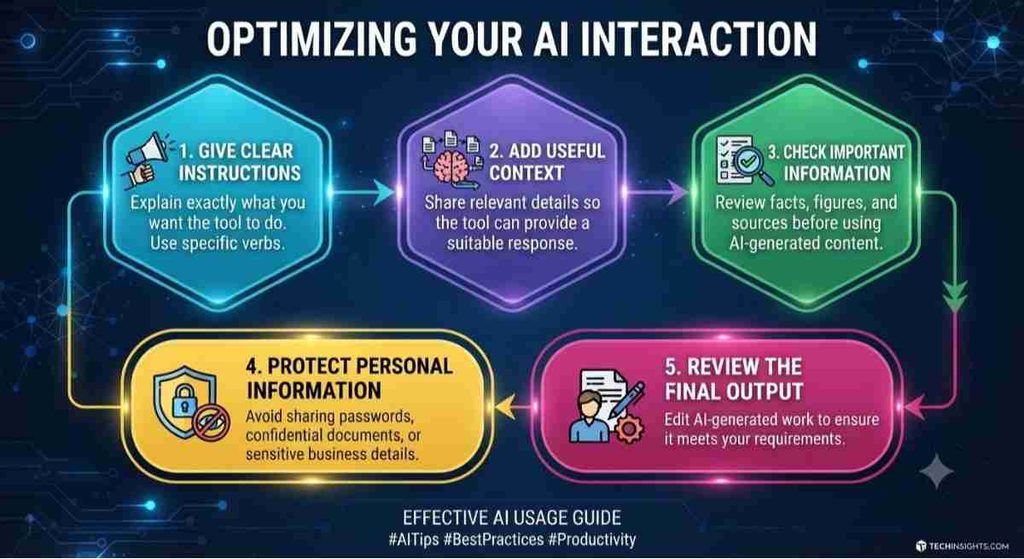
Using an AI tool effectively is not just about entering a question. Clear instructions can make a big difference in the quality of the results.
- Give clear instructions: Explain exactly what you want the tool to do.
- Add useful context: Share relevant details so the tool can provide a suitable response.
- Check important information: Review facts, figures, and sources before using AI-generated content.
- Protect personal information: Avoid sharing passwords, confidential documents, or sensitive business details.
- Review the final output: Edit AI-generated work to ensure it meets your requirements.
Final Thoughts
AI is making everyday work easier by helping people write, research, design, organize tasks, and automate repetitive activities. From ChatGPT and Gemini to Canva AI, Zapier, and Motion, each application offers different ways to improve productivity.
Whether you need a free option for everyday tasks or an advanced tool for professional work, understanding how to choose the right AI tool can help you find the best solution for your needs.
Start with the free features, explore the tools that match your requirements, and use AI wisely to save time and focus on more important work.
Frequently Asked Questions (FAQs)
1. What Are AI Productivity Tools?
AI Productivity Tools are software applications that use artificial intelligence to help users complete tasks faster, improve efficiency, and save time in their daily work.
2. What Are the Best AI Productivity Tools in 2026?
Some popular AI Productivity Tools in 2026 include ChatGPT, Google Gemini, Canva AI, Zapier, Microsoft Copilot, and Motion. Each offers different features for writing, designing, research, and automation.
3. Are AI Productivity Tools Free to Use?
Yes, many AI tools offer free plans with basic features. However, advanced options, higher usage limits, and premium features may require a paid subscription.
4. How Can AI Tools Improve Daily Productivity?
AI tools can improve daily productivity by automating repetitive activities, generating content, organizing schedules, summarizing information, and reducing manual work.
5. Which AI Tools Are Best for Beginners?
ChatGPT, Google Gemini, and Canva AI are beginner-friendly options. They help users with writing, research, brainstorming, and graphic design without requiring advanced technical skills.
6. How Do AI Productivity Tools Help Small Businesses?
AI Productivity Tools help small businesses manage marketing activities, create content, respond to customers, organize tasks, and automate everyday workflows.
7. Can AI Tools Help Students Save Time?
Yes, students can use AI tools to summarize study materials, understand difficult topics, generate ideas, conduct research, and organize their study schedules.
8. Are AI Productivity Tools Safe for Professional Use?
Many popular platforms provide security features and privacy controls. However, users should review privacy policies and avoid entering confidential business or personal information.
9. Can AI Automation Tools Reduce Repetitive Work?
Yes, automation platforms such as Zapier can connect different applications and automate repetitive tasks, helping users save time and improve workflow efficiency.
10. How Should I Choose the Best AI Tool for My Needs?
Compare the available features, pricing, ease of use, accuracy, and security. Select an option that matches your requirements and offers practical benefits for your daily activities.