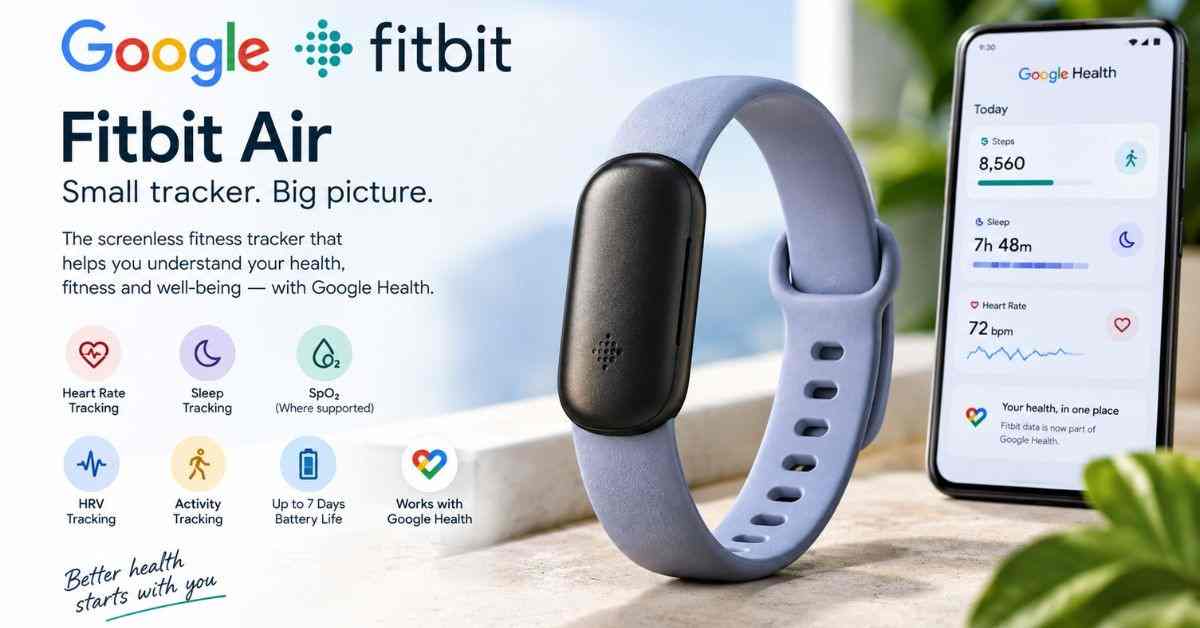
If you are searching for a Google Fitbit Air fitness tracker that focuses on health and fitness without the distractions of a smartwatch, Fitbit Air is one of Google’s newest wearable options to consider in 2026.
Unlike traditional fitness trackers with a screen, notifications, apps, and a large display, the Google Fitbit Air uses a small, screenless design. It continuously collects health and activity information and sends the data to the Google Health app on your smartphone.
Google introduced Fitbit Air in May 2026 as a lightweight, screenless wearable designed for comfortable all-day and overnight tracking. The device tracks information such as heart rate, sleep, activity, heart-rate variability, resting heart rate and, in supported regions, blood oxygen and irregular heart-rhythm notifications.
This makes Fitbit Air particularly interesting for people who want fitness tracking without wearing a traditional smartwatch.
Quick answer: Google Fitbit Air is best suited to people who prioritize lightweight 24/7 health and sleep tracking, long battery life and a distraction-free design. Its biggest limitation is also its defining feature: there is no screen, so you need your phone and the Google Health app to see detailed information.
Google Fitbit Air at a Glance
| Feature | Google Fitbit Air |
|---|---|
| Product type | Screenless fitness and wellness tracker |
| Brand | Google Fitbit |
| Display | No screen |
| Weight | About 5.2 g without band; about 12 g with band |
| Dimensions | 34.9 × 17 × 8.3 mm without band |
| Battery | Up to 7 days |
| Fast charging | Up to a day’s power in about 5 minutes |
| Heart-rate tracking | Yes |
| Sleep tracking | Yes |
| Heart-rate variability | Yes |
| Resting heart rate | Yes |
| SpO2 estimation | Yes, availability varies by region |
| Irregular rhythm notifications | Available, subject to eligibility and region |
| GPS | Phone-connected GPS |
| Automatic activity tracking | Yes |
| Google Health app | Required |
| Android compatibility | Android 11 or newer |
| iPhone compatibility | iOS 16.4 or newer |
| Water resistance | Water-resistant coating |
| Google Health Premium | 3-month trial included |
| U.S. starting price | $99.99 |
| India launch price | ₹13,999 |
| Screen | None |
Google’s current technical specifications list Fitbit Air at 34.9 × 17 × 8.3 mm and approximately 5.2 g without the band. Google also rates battery life at up to seven days, although actual battery life varies according to settings and usage.
What Is Google Fitbit Air?
Google Fitbit Air is a screenless fitness tracker designed for continuous health and wellness tracking.
Instead of putting a display on your wrist, Fitbit Air places the emphasis on sensors and the Google Health app. The tracker collects information throughout the day and night, while the smartphone app provides the detailed view of your activity, sleep and health trends.
This is an important difference between Fitbit Air and products such as the Fitbit Charge 6 or a Pixel Watch.
A traditional smartwatch or fitness tracker generally gives you information directly on your wrist. Fitbit Air deliberately removes that layer.
The concept is simple:
Wear Fitbit Air → collect health data → sync with Google Health → review trends and insights on your phone.
Google Fitbit Air Design
The most noticeable part of the Fitbit Air design is what it doesn’t have.
There is no conventional screen.
There are no watch faces.
There is no scrolling through menus on your wrist.
There isn’t a large smartwatch-style case.
Instead, Fitbit Air uses a small pebble-shaped tracker that sits inside its wristband.
Google lists the tracker at approximately:
- 34.9 mm long
- 17 mm wide
- 8.3 mm high
- 5.2 g without the band
- Approximately 12 g with the band
That lightweight construction makes the device particularly interesting for people who dislike sleeping with a large smartwatch.
Screenless design: advantage or disadvantage?
It depends on how you use a fitness tracker.
If you want to quickly check:
- Steps
- Heart rate
- Workout statistics
- Time
- Notifications
- GPS information
directly from your wrist, Fitbit Air may feel restrictive.
But if your priority is:
- Sleep tracking
- All-day health monitoring
- Lightweight comfort
- Minimal distractions
- Long battery life
the screenless design can make a lot of sense.
Google Fitbit Air Health Tracking Features
Health tracking is the main reason to consider Fitbit Air.
The device is designed to collect a range of health and wellness metrics that can then be viewed through the Google Health app.
Google says Fitbit Air can track metrics including heart rate, heart rhythm information, SpO2, resting heart rate, heart-rate variability, sleep stages and sleep duration.
1. 24/7 Heart Rate Tracking
Heart-rate tracking is one of the core functions of Fitbit Air.
The tracker continuously collects heart-rate information so the Google Health app can use that data for different fitness and wellness insights.
Heart-rate information can contribute to:
- Resting heart rate
- Exercise intensity
- Cardio-related metrics
- Calories burned
- Sleep insights
- Recovery-related information
However, heart-rate tracking should be treated as a wellness feature rather than a replacement for professional medical equipment.
Google specifically notes that the accuracy of heart-rate tracking can be affected by factors such as physiology, device position, movement and activity.
2. Sleep Tracking
Sleep is one of the strongest reasons to choose a small screenless tracker.
Because Fitbit Air is lightweight and designed for 24/7 wear, you can keep it on while sleeping and review your sleep information in the Google Health app.
The tracker can provide information about:
- Sleep duration
- Sleep stages
- Sleep trends
- Heart rate during sleep
- Other sleep-related metrics
Google says Fitbit Air can track sleep stages and duration and provide sleep information through the Google Health app.
For people who find a traditional smartwatch uncomfortable during sleep, Fitbit Air’s small size could be a major advantage.
3. Blood Oxygen Tracking
Fitbit Air can estimate blood oxygen saturation (SpO2) during sleep.
The Google Health app can then show SpO2 trends and average measurements where the feature is supported.
However, there are important limitations.
SpO2 tracking is not available in every country, and Google states that Fitbit health measurements are not intended to diagnose or treat medical conditions.
Therefore, SpO2 information should be considered a wellness trend rather than a medical diagnosis.
4. Heart-Rate Variability
Heart-rate variability, commonly abbreviated as HRV, is another metric supported by Fitbit Air.
HRV represents variation in the time between heartbeats. Fitness platforms can use HRV as one part of broader recovery and wellness analysis.
The important point is that a single HRV measurement doesn’t tell you everything about your health.
Trends over time are generally more useful than focusing on one day’s number.
Fitbit Air can provide HRV data through the Google Health ecosystem, helping users understand changes in their overall wellness patterns.
5. Resting Heart Rate
Resting heart rate is another useful metric for understanding longer-term fitness and wellness trends.
For example, someone who regularly exercises may monitor whether their resting heart rate changes over weeks or months.
Fitbit Air collects heart-rate information that can contribute to resting-heart-rate insights in the Google Health app.
Again, this is best viewed as a trend rather than a diagnostic measurement.
6. Irregular Rhythm Notifications
One of the more advanced capabilities of Fitbit Air is support for irregular heart-rhythm notifications.
Google says Fitbit Air can collect information that may be used to notify users about possible irregular heart rhythms associated with atrial fibrillation (AFib), where the feature is available and eligibility requirements are met.
This feature has important restrictions.
Availability varies by country, and Google provides specific eligibility and safety limitations.
It should not be interpreted as a general-purpose heart-health diagnostic system.
If you receive a health-related notification that concerns you, professional medical advice is appropriate.
Google Fitbit Air Fitness Tracking
Although Fitbit Air has no screen, it is still designed to support everyday exercise and fitness tracking.
The device can automatically recognize many activities and sync the resulting information to the Google Health app.
You can use it for activities such as:
- Walking
- Running
- Cycling
- General workouts
- Other automatically recognized activities
Google says Fitbit Air can automatically recognize and record many activities, while workout information can be reviewed in the Google Health app.
This makes the tracker particularly suitable for people who don’t need a full smartwatch interface while exercising.
Does Google Fitbit Air Have GPS?
Yes, but Fitbit Air does not have built-in GPS.
This is an important distinction.
Google’s GPS documentation lists Google Fitbit Air as using phone-connected GPS. That means you need your compatible smartphone with you if you want GPS data for distance-based activities.
For example, if you go for a run with Fitbit Air, your phone provides the GPS positioning rather than the tracker itself.
Fitbit Air GPS vs Fitbit Charge 6
| Feature | Fitbit Air | Fitbit Charge 6 |
|---|---|---|
| Built-in GPS | No | Yes |
| Phone-connected GPS | Yes | Yes |
| Screen | No | AMOLED |
| Battery | Up to 7 days | Up to 7 days |
| Lightweight design | Yes | Yes |
| Phone required for GPS | Yes | Not necessarily |
This is one of the biggest reasons a serious runner may prefer the Charge 6 over Fitbit Air.
Google Health App: The Center of Fitbit Air
Fitbit Air is designed to work closely with the Google Health app.
This is important because the device itself doesn’t have a display.
Google transitioned the Fitbit app into the Google Health app beginning in May 2026. The redesigned app brings Fitbit data and broader health information into a new interface with sections for Today, Fitness, Sleep and Health.
Your Fitbit Air data is synchronized to the app using Bluetooth.
From there, you can review information such as:
- Steps
- Distance
- Calories
- Sleep stages
- Heart rate
- Cardio load
- Fitness information
- Health trends
Google’s support documentation confirms that Fitbit Air automatically syncs various health and fitness metrics to the Google Health app.
Google Health Premium and Fitbit Air
One thing buyers should understand before purchasing Fitbit Air is the difference between basic tracking and premium features.
Google Fitbit Air includes a three-month trial of Google Health Premium in supported offers. Google Health Premium includes additional coaching and advanced features.
Google’s current Health Premium offering also includes Google Health Coach, which uses Gemini technology to provide personalized fitness, sleep and wellness guidance.
The premium subscription is separate from the hardware purchase.
That means buyers should consider the long-term subscription cost when calculating the overall value of Fitbit Air.
Google announced Google Health Premium at $9.99 per month or $99 per year in its May 2026 announcement, although pricing, availability and included benefits can vary by market.
Google Health Coach and Fitbit Air
The combination of Fitbit Air and Google Health Coach is arguably the most interesting part of the product.
A traditional fitness tracker mostly gives you numbers.
The Google Health ecosystem aims to go further by using those numbers to provide personalized guidance.
For example, instead of simply seeing your activity data, the Health Coach can use your goals and health trends to help create personalized fitness or sleep plans.
Google describes the Health Coach as a personalized companion that can adapt recommendations based on your progress, goals and changing circumstances.
This is where Fitbit Air becomes more than a basic step counter.
However, users should remember that AI-generated health guidance isn’t a substitute for a doctor or other qualified healthcare professional.
Google Fitbit Air Battery Life
Battery life is another major advantage of the Fitbit Air.
Google rates Fitbit Air for up to seven days of battery life. Actual battery life depends on settings, usage, environmental conditions and other factors.
Google also highlights fast charging, stating that Fitbit Air can get approximately a full day of power from about five minutes of charging.
This is particularly useful for sleep tracking.
Imagine charging your tracker briefly while getting ready in the morning rather than needing to charge it every night.
Battery comparison
| Device | Claimed battery life |
|---|---|
| Google Fitbit Air | Up to 7 days |
| Fitbit Charge 6 | Up to 7 days |
| Fitbit Inspire 3 | Up to 10 days |
| Pixel Watch 5 | Up to 40 hours with always-on display |
Battery figures are manufacturer estimates and can vary significantly depending on usage.
Google Fitbit Air Compatibility
Fitbit Air works with both Android and iPhone.
Google lists compatibility with:
- Android 11 or newer
- iOS 16.4 or newer
A Google Account and the Google Health app are required.
This makes Fitbit Air more flexible than an Android-only smartwatch.
If you use an iPhone but don’t want an Apple Watch, Fitbit Air is therefore an option worth considering.
Google Fitbit Air Price
Pricing depends on the country.
Google announced the Fitbit Air in the U.S. with a starting price of $99.99, while the Stephen Curry Special Edition launched at $129.99.
For India, Google announced Fitbit Air at ₹13,999, with availability beginning October 2, 2026 through the Google Store and retail partners.
Price overview
| Market | Starting price |
|---|---|
| United States | $99.99 |
| India | ₹13,999 |
| Stephen Curry Special Edition | $129.99 in the U.S. |
Prices and availability can change, so buyers should check Google’s current store listing before purchasing.
Google Fitbit Air vs Fitbit Charge 6
The Fitbit Charge 6 is probably the most useful comparison because both products target fitness-focused users.
| Feature | Fitbit Air | Charge 6 |
|---|---|---|
| Screen | ❌ No | ✅ AMOLED |
| Weight | Approx. 12 g with band | Approx. 30 g |
| Battery | Up to 7 days | Up to 7 days |
| Built-in GPS | ❌ No | ✅ Yes |
| Sleep tracking | ✅ | ✅ |
| Heart rate | ✅ | ✅ |
| SpO2 | ✅* | ✅* |
| ECG | — | ✅ |
| Google Maps | — | ✅ |
| Google Wallet | — | ✅ |
| Workout display | ❌ | ✅ |
| Phone required for detailed data | ✅ | Less dependent |
| Main advantage | Comfort and simplicity | More functionality |
*Availability of certain health features varies by country.
Google’s Charge 6 includes a color AMOLED display, built-in GPS, ECG capability, Google Maps and Google Wallet, while Fitbit Air is deliberately more minimal.
Which should you buy?
Choose Fitbit Air if you want:
- A very lightweight tracker
- Better distraction-free wearability
- Comfortable sleep tracking
- Up to seven days of battery
- Basic-to-advanced wellness tracking through your phone
Choose Charge 6 if you want:
- A screen
- Built-in GPS
- On-device workout statistics
- ECG
- Google Maps
- Google Wallet
- More smartwatch-like functionality
Google Fitbit Air vs Smartwatch
A smartwatch is designed to do many things.
A screenless fitness tracker is designed to do fewer things, but often does those things more quietly.
Smartwatch advantages
A smartwatch can provide:
- Notifications
- Apps
- Calls
- Maps
- Music controls
- On-device workout data
- A clock
- More interactive features
Fitbit Air advantages
Fitbit Air focuses on:
- Health tracking
- Sleep tracking
- Comfort
- Battery life
- Minimal distractions
- Small size
- Phone-based insights
For someone who already owns a smartphone and doesn’t want another screen on their wrist, Fitbit Air’s approach is compelling.
Is Google Fitbit Air Waterproof?
Fitbit Air has a water-resistant design intended for everyday use and exercise.
However, users should follow Google’s care instructions rather than treating the device as indestructible.
Google recommends removing and drying the device and band properly if they become wet or sweaty.
Water resistance can also change over the lifetime of a wearable.
So although Fitbit Air is designed to handle normal active use, it should still be cared for properly.
How to Set Up Google Fitbit Air
Setting up Fitbit Air is relatively straightforward.
Step 1: Charge the tracker
Connect Fitbit Air to its included USB-C charging cable.
Step 2: Install Google Health
Install the Google Health app on your compatible Android or iPhone.
Step 3: Sign in
Use your Google Account to access the Fitbit/Google Health ecosystem.
Step 4: Pair Fitbit Air
Follow the instructions in the Google Health app to connect the tracker.
Step 5: Wear it correctly
Google recommends wearing Fitbit Air on the top of your wrist, positioned behind the wrist bone, with enough contact to keep the sensor against your skin.
Step 6: Start tracking
Once connected, Fitbit Air can begin collecting activity and health information.
Who Should Buy Google Fitbit Air?
Google Fitbit Air makes the most sense for a specific type of user.
1. People who want a simple fitness tracker
If you don’t need apps or notifications on your wrist, Fitbit Air removes unnecessary complexity.
2. People who prioritize sleep tracking
Its lightweight, screenless form factor is particularly suitable for overnight wear.
3. People who dislike smartwatches
Some people simply don’t want another screen competing for their attention.
Fitbit Air gives them health tracking without the typical smartwatch experience.
4. People who want long battery life
Up to seven days is convenient compared with many smartwatches.
5. People already using Google services
The device fits naturally into the Google Health ecosystem, especially for users interested in Google Health Coach.
Who Should Not Buy Google Fitbit Air?
Fitbit Air isn’t perfect for everyone.
You may want another device if you need:
Built-in GPS
Fitbit Air relies on your phone for GPS.
A display
There is no screen.
On-device workout statistics
You need your smartphone for the detailed experience.
Advanced smartwatch functions
If you want apps, extensive notifications, navigation and other interactive functions, a smartwatch is more appropriate.
Maximum sports functionality
Serious runners and athletes may prefer a device with built-in GPS and a richer on-device workout interface.
Pros and Cons of Google Fitbit Air
Pros
- Very lightweight
- Screenless and distraction-free
- Up to seven days of battery life
- Strong sleep-tracking focus
- 24/7 heart-rate tracking
- HRV and resting heart-rate information
- SpO2 estimation where supported
- Irregular rhythm notifications where supported
- Android and iPhone compatibility
- Google Health integration
- Google Health Coach integration
- Fast charging
- Relatively affordable starting price
Cons
- No display
- No built-in GPS
- Requires a smartphone for detailed information
- Some advanced features require Google Health Premium
- Certain health features vary by country
- Not intended as a medical diagnostic device
- Less useful for people who want smartwatch functionality
Is Google Fitbit Air Worth It?
For the right user, yes.
The Google Fitbit Air is not trying to replace a full smartwatch.
Its value comes from doing something different.
It provides a lightweight, screenless way to continuously collect health and fitness information without putting a large computer on your wrist.
The combination of:
small design + long battery life + sleep tracking + heart-rate monitoring + Google Health
makes it a particularly interesting option for people who want a wearable that stays in the background.
However, the lack of a screen is a major trade-off.
If you want to look at your running pace, navigate with maps, use Google Wallet or interact with notifications directly on your wrist, a Fitbit Charge 6 or Pixel Watch makes more sense. Google’s current lineup positions Fitbit Air as the screenless option alongside devices such as Charge 6 and Pixel Watch.
Frequently Asked Questions About Google Fitbit Air
What is Google Fitbit Air?
Google Fitbit Air is a small, screenless fitness and wellness tracker designed for continuous activity, sleep and health tracking. Data is viewed through the Google Health app.
Does Fitbit Air have a screen?
No. Google Fitbit Air is completely screenless.
This is its defining difference from conventional fitness trackers and smartwatches.
How long does Fitbit Air battery last?
Google rates the Fitbit Air battery for up to seven days, although actual battery life depends on usage and settings.
Does Fitbit Air track sleep?
Yes. Fitbit Air tracks sleep information including sleep duration and sleep stages through the Google Health ecosystem.
Does Fitbit Air have GPS?
Fitbit Air does not have built-in GPS. It uses your phone’s GPS for location-based exercise tracking.
Can Fitbit Air track heart rate?
Yes. Heart-rate tracking is one of its core health features.
Does Fitbit Air measure blood oxygen?
Yes, Fitbit Air can estimate SpO2 during sleep where the feature is supported. Availability varies by region.
Does Fitbit Air work with iPhone?
Yes. Google lists support for iPhones running iOS 16.4 or later. Android devices require Android 11 or later.
Does Fitbit Air require Google Health Premium?
Basic tracking is available through the Google Health app, while some advanced features and personalized coaching require Google Health Premium.
How much does Google Fitbit Air cost?
The U.S. starting price is $99.99, while Google’s India launch price is ₹13,999. Pricing can vary by country and retailer.
Is Fitbit Air a medical device?
No. Google explicitly states that Fitbit health and wellness features are not intended to diagnose or treat medical conditions.
Final Verdict: Should You Buy Google Fitbit Air?
The Google Fitbit Air fitness tracker is an interesting alternative to traditional smartwatches and screen-based fitness trackers.
Its biggest strengths are not flashy features. Instead, it focuses on comfort, simplicity, battery life and continuous health tracking.
For someone who wants to track sleep, heart rate, activity and wellness trends without wearing a bulky smartwatch, Fitbit Air is a strong option.
The main compromises are equally clear:
- No display
- No built-in GPS
- Greater dependence on your smartphone
- Some advanced features require a subscription
- Health-feature availability varies by region
Overall, Google Fitbit Air is best viewed as a dedicated health-and-fitness companion rather than a smartwatch.
If your priority is discreet 24/7 tracking, especially sleep and recovery, Fitbit Air is compelling. If you want on-device workout data, GPS, apps and smartwatch features, the Fitbit Charge 6 or a Pixel Watch is likely the better choice.
