If your website traffic suddenly dropped after September 24, 2026, you are probably asking yourself the same question that a lot of site owners ask whenever Google rolls out another major change:
“What did Google do, and what am I supposed to fix?”
The frustrating part is that there usually isn’t a simple answer.
You may see your traffic falling while another website in the same niche is doing just fine. One section of your site may lose half of its Google traffic while another section barely moves. Sometimes rankings come back on their own. Sometimes they don’t.
And then there is the worst part: when you search for an explanation, you find dozens of articles saying almost the same thing—improve your content, build better links, follow Google’s guidelines.
That’s technically correct, but it doesn’t tell a website owner what to actually do on Monday morning.
So let’s approach this differently.
Google started rolling out its September 2026 Spam Update on September 24, 2026. Google says the update applies globally, across all languages, and the rollout can take up to two weeks.
That means something very important for anyone looking at their analytics right now:
September 27 is too early to treat the current numbers as the final result.
Your website might be genuinely affected. But it is also possible that you’re seeing normal volatility while the update is still moving through Google’s systems.
So before you delete half your website or rewrite 500 articles, take a breath and figure out what actually changed.
First, Don’t Assume Every Traffic Drop Is a Penalty
This is probably the first mistake I would avoid.
A traffic drop and a Google penalty are not automatically the same thing.
Your website can lose organic traffic for several reasons:
- your rankings dropped
- competitors gained visibility
- search demand changed
- Google changed how it interprets the query
- the search result layout changed
- users are getting answers directly in Google
- your pages became less relevant
- technical problems appeared
- your content quality is weaker than competing pages
- or your site really does have spam-related problems
These situations can look almost identical in Google Analytics.
For example, imagine your website normally gets 10,000 clicks per day from Google.
Suddenly it gets 6,000.
At first glance, you might say:
“Google penalized my site.”
But that’s not enough information.
You need to know which pages lost those 4,000 clicks and which queries were responsible for them.
That is where the real investigation starts.
What Exactly Has Google Confirmed About the September 2026 Spam Update?
Google’s Search Status Dashboard identifies the current rollout as the September 2026 Spam Update.
It began on September 24, 2026, and Google says it affects search globally and across languages. The stated rollout window is up to two weeks.
Google has not published a simple checklist saying:
“These exact five things are being punished in this update.”
So be careful when reading SEO posts claiming they know exactly what Google changed internally.
Nobody outside Google has access to that information.
What we can do is look at Google’s existing spam policies and then compare those policies with what we are seeing on websites that have lost visibility.
Google’s spam documentation covers practices such as scaled content abuse, doorway abuse, scraping, link spam, misleading functionality and other attempts to manipulate Search.
That gives us something much more useful than guessing about a secret ranking factor.
The First Thing I Would Check: What Kind of Pages Lost Traffic?
Don’t start with your homepage.
Don’t start by changing your logo.
Don’t change your entire website design.
Open Google Search Console and look at the pages that actually lost visibility.
This is where the investigation gets interesting.
Suppose you have 2,000 indexed pages.
After the update:
- 300 pages are down
- 1,500 pages are basically stable
- 200 pages have actually gained impressions
That tells you something.
The website probably doesn’t have one giant problem affecting every page equally.
There may be something about those 300 pages that separates them from the rest.
Maybe they’re location pages.
Maybe they’re AI-generated articles.
Maybe they’re old affiliate reviews.
Maybe they’re pages targeting nearly identical keywords.
Maybe they’re pages that contain very little original information.
You won’t know until you compare them.
Use Google Search Console Like a Detective
This is one of those situations where Search Console is more useful than reading another 20 SEO articles.
Go to:
Search Console → Performance → Search results
Look at:
- Clicks
- Impressions
- CTR
- Average position
- Queries
- Pages
- Countries
- Devices
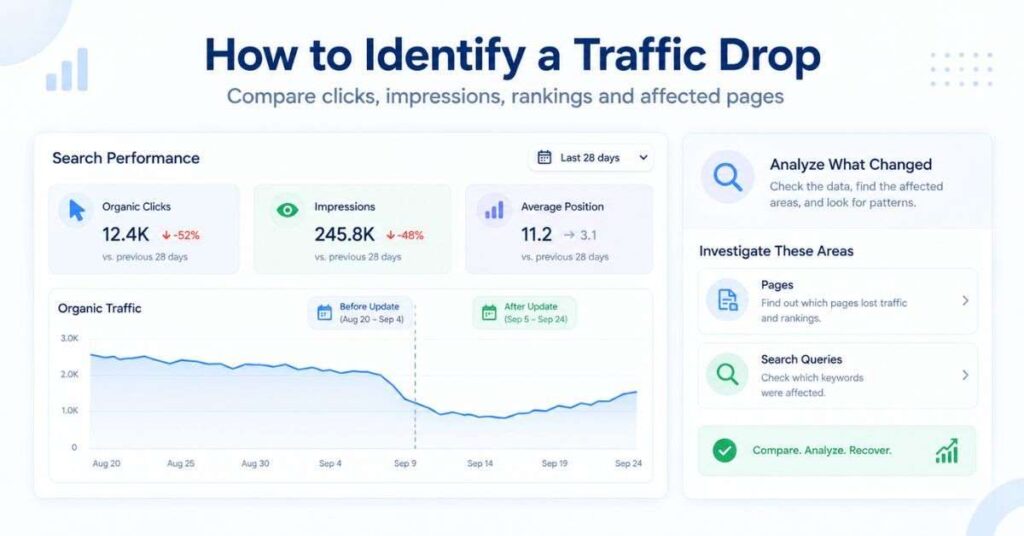
And don’t only compare the last seven days with the previous seven days.
Because we’re dealing with an update that started on September 24, you want to establish a few different comparisons.
For example:
September 24–27, 2026 vs. September 17–20, 2026
and, where enough data is available:
September 24–27, 2026 vs. the same period in 2025
You’re looking for patterns rather than one scary percentage.
A Simple Example
Let’s say one of your pages was ranking like this:
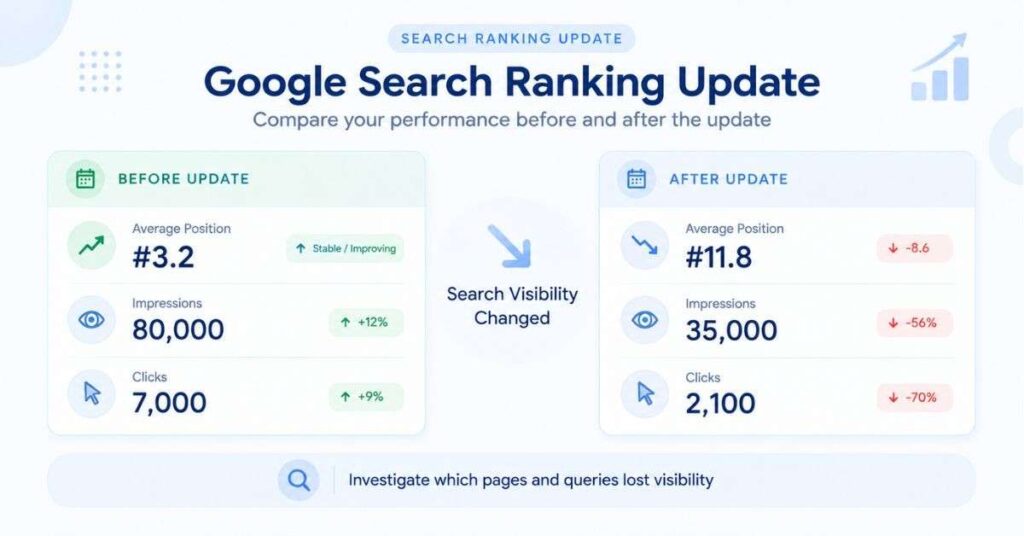
“Best budget laptops under $500”
Before the update:
- Average position: 3.2
- Impressions: 80,000
- Clicks: 7,000
After the change:
- Average position: 11.8
- Impressions: 35,000
- Clicks: 2,100
That’s a significant change.
Now look at another page:
“How much RAM does a laptop need?”
Before:
- Position: 6.1
- Impressions: 20,000
- Clicks: 1,400
After:
- Position: 6.4
- Impressions: 19,000
- Clicks: 1,350
Almost nothing changed.
That’s useful information.
Your first page deserves investigation.
Your second page probably doesn’t need emergency surgery.
This sounds obvious, but many site owners skip this step and start editing the entire domain.
Look for Patterns Among the Pages That Dropped
Once you’ve identified your biggest losers, put them in a spreadsheet.
Nothing fancy is required.
Use columns such as:
| Page | Topic | Before | After | Search Intent | Content Type | Next Step |
|---|---|---|---|---|---|---|
/best-budget-laptops | Budget Laptops | 8,200 | 2,900 | Informational | Guide | Audit |
/web-hosting-reviews | Web Hosting | 4,100 | 3,900 | Commercial | Review | Monitor |
/best-free-tools | Free Tools | 3,800 | 900 | Informational | List | Rewrite |
/how-to-backup-data | Data Backup | 2,500 | 2,400 | Informational | Tutorial | Keep |
Then ask yourself something very simple:
What do these pages have in common?
This question is often more valuable than trying to guess Google’s algorithm.
Maybe the Problem Is Scaled Content
One area worth taking seriously is scaled content abuse.
Google’s spam policies describe scaled content abuse as producing large amounts of content primarily to manipulate search rankings rather than to genuinely help users. Google makes an important distinction here: the issue isn’t simply whether content was created by AI. The issue is whether the content is being produced at scale without adding meaningful value.
That’s an important difference.
Let’s say someone publishes 20 well-researched articles using AI as part of the writing process.
That’s very different from publishing 20,000 pages where each page:
- uses the same template
- changes only the keyword
- repeats the same information
- contains no original research
- provides no unique examples
- exists primarily to capture another search query
The second model is much harder to defend from a quality standpoint.
AI Content Isn’t Automatically the Problem
This needs to be said clearly because there is a lot of confusion about it.
You should not look at your website and think:
“I used AI, so Google must have removed my rankings.”
That’s an oversimplification.
The better question is:
Did AI help me create something useful, or did I use AI to manufacture pages?
There is a huge difference.
Imagine you run a technology website.
You personally research a topic, test a product, collect screenshots, check official documentation and then use AI to help organize your notes.
The final article can contain genuine value.
Now compare that with:
Keyword → AI prompt → 2,000 words → publish → next keyword.
Do that 1,000 times and you have a completely different website.
The second approach can create pages that look polished but don’t really offer anything new.
“Humanizing” AI Content Is Not the Same as Making It Useful
This is another trap I see everywhere.
People take an AI article and put it through a “humanizer.”
The tool changes:
“In today’s rapidly evolving digital landscape…”
into:
“Let’s be honest, things are changing fast…”
The sentences look different.
The information hasn’t changed.
That’s not real humanization.
Real human writing usually contains specificity.
A person who actually researched something tends to mention details.
They explain why something matters.
They make distinctions.
They sometimes say:
“This sounds simple, but there’s a catch.”
Or:
“Here’s where most people get confused.”
Or:
“I wouldn’t rely on this alone because…”
Those little decisions come from thinking about the subject, not simply changing sentence patterns.
And that’s exactly what your article should do.
Ask Yourself: “What Did I Add?”
This is one of the most useful questions you can ask before publishing anything.
Suppose the top ten Google results all say:
“X is a service that allows users to do Y.”
You write the same thing in different words.
What did you add?
Probably nothing.
Now suppose you:
- tested the service
- compared pricing
- checked its official documentation
- found an important limitation
- explained a confusing setting
- added screenshots
- answered questions users frequently ask
- explained what happens in real-world situations
Now you’ve added something.
That’s the kind of information gap worth building content around.
Check for Pages That Are Basically the Same
Another thing I would audit is duplication—not just literal duplicate content, but duplicate intent.
For example, imagine a website has:
- Best Web Hosting
- Best Web Hosting Providers
- Top Web Hosting Services
- Best Hosting Services
- Best Hosting Companies
- Top Hosting Providers
If all six pages are essentially the same article, you’re not giving Google six genuinely different resources.
You’re dividing one topic across six URLs.
Instead, you could have:
Best Web Hosting Services
Then genuinely different supporting content:
- Best Hosting for WordPress
- Best Hosting for Small Businesses
- How to Choose Web Hosting
- Shared Hosting vs VPS
- How Much Web Hosting Do You Need?
Now every page has a reason to exist.
Location Pages Need Special Attention
This is another common problem.
Let’s say a company operates in 50 cities.
It creates:
- Service in New York
- Service in Chicago
- Service in Boston
- Service in Miami
- Service in Dallas
But every page says exactly the same thing.
Only the city name changes.
That isn’t a strong local content strategy.
If you’re going to create local pages, give people something genuinely local:
- actual service area
- local pricing information
- local regulations
- local availability
- local customer questions
- local examples
- relevant contact information
- real business details
A location page should exist because the location changes the information—not because adding another city gives you another keyword.
Check Your Affiliate Pages Too
Affiliate sites need to be particularly honest with themselves.
There is nothing wrong with earning affiliate revenue.
The problem is a page that provides almost no value beyond sending someone to another website.
Imagine a product review containing:
Product name
Price
5-star rating
Manufacturer description
Buy Now
A user could get that information from the manufacturer.
Now imagine a review where you actually explain:
- what the product is good at
- what it isn’t good at
- who should buy it
- who shouldn’t
- what changed in the latest version
- how it compares with alternatives
- what the manufacturer claims
- what independent testing shows
- what problems users should know about
That’s a completely different experience.
Don’t Forget About Scraped Content
This one sounds obvious, but it’s still surprisingly common.
Some websites copy another article.
Others rewrite it.
Others use AI to summarize ten existing articles.
The wording changes, but the underlying information remains derivative.
Google’s spam documentation specifically discusses scraping and content created by taking information from other sources without adding substantial value.
So don’t ask:
“Did I copy the exact sentence?”
Ask:
“Did I contribute anything meaningful?”
That’s the better test.
What About Backlinks?
If your rankings dropped, you might be tempted to buy backlinks immediately.
I wouldn’t.
At least not as your first reaction.
First, look at your existing link profile.
Ask:
- Are there obvious paid links?
- Are there huge numbers of unrelated links?
- Is exact-match anchor text overused?
- Did someone run an automated link campaign?
- Are there sitewide links from unrelated websites?
- Are there suspicious guest-post networks?
Google’s spam policies include link spam among the practices it considers manipulative.
But there’s another important point:
Not every bad-looking backlink caused your ranking drop.
Don’t turn backlink cleanup into a ritual where you spend three weeks disavowing every strange domain you can find.
First establish whether links are actually part of the problem.
Another Area Worth Checking: Site Reputation Abuse
If you’ve got a strong domain, take a look at what has been added to it over time.
Did the site originally focus on one subject and then suddenly start publishing a huge amount of unrelated content?
For example:
A technology website suddenly starts publishing hundreds of pages about casino offers, loans, coupons, medical products and unrelated commercial services.
The domain already has authority, so someone hopes the new content will rank faster.
Google updated its Site Reputation Abuse policy on August 28, 2026, and describes the issue as third-party content published on a host site primarily to take advantage of that site’s established ranking signals.
So look at your website as a whole.
Ask:
Does everything here actually belong together?
If the answer is no, that’s worth addressing.
What If Your Traffic Dropped 80%?
This is where emotions usually take over.
Someone sees:
100,000 visits → 20,000 visits
and thinks:
“The website is finished.”
Not necessarily.
First find out whether the loss is:
- sitewide
- category-specific
- page-specific
- keyword-specific
- country-specific
- device-specific
Then check whether the pages have disappeared completely or simply moved down.
A page moving from position 2 to position 8 is a very different situation from a page disappearing from Google’s index.
And a page that has gone from position 2 to position 5 may have lost a lot of clicks without there being anything “wrong” with the page.
Search results are competitive.
Someone else can move up.
Check Whether Google Still Has Your Pages Indexed
If traffic suddenly collapses, don’t assume it is purely a ranking issue.
Check indexing.
Look for:
- accidental noindex
- robots.txt changes
- canonical mistakes
- redirects
- server errors
- broken pages
- sitemap problems
- JavaScript rendering issues
- hacked pages
- deleted content
A technical problem can look exactly like an algorithm update if you only look at the traffic graph.
Don’t Rewrite Your Entire Website at Once
This is probably the worst recovery strategy.
Imagine you have 2,000 articles.
You panic.
You rewrite all 2,000.
Three weeks later, traffic is still down.
Now you don’t know:
- which changes helped
- which changes hurt
- which pages were already fine
- whether the update even caused the problem
Make changes in groups.
Start with your biggest affected page type.
Improve 10–20 representative pages.
Monitor them.
Then expand.
That gives you a much clearer picture.
What Should You Actually Change on a Weak Article?
Don’t just make it longer.
That’s another common mistake.
A weak 1,500-word article doesn’t automatically become good when you turn it into 3,500 words.
Sometimes it becomes worse.
Instead, ask:
What question brought the visitor here?
Answer it early.
What information is missing?
Add it.
What would confuse a beginner?
Explain it.
What claim needs evidence?
Cite it.
What do competing pages fail to explain?
Cover it.
What can I demonstrate?
Show it.
Which sections are unnecessary?
Remove them.
That last one matters more than people think.
Good editing is often about removing things.
Write Like You’re Talking to One Real Person
This is the change I would make if I wanted the article to feel human.
Don’t write:
“It is important to note that website owners should carefully analyze their organic search performance.”
Say:
“Before you change anything, open Search Console and find the pages that actually lost traffic.”
The second sentence is clearer.
It also sounds like someone is actually trying to help you.
You don’t need to make every sentence conversational. You’re still writing a serious SEO article.
But don’t make every paragraph sound like it came from a corporate handbook.
Use Real Examples
Examples make technical SEO topics much easier to understand.
Instead of saying:
“Analyze content patterns across affected URLs.”
Say:
“If 80% of the pages that lost traffic are location pages, don’t spend your first week rewriting your product reviews. Start by comparing those location pages. Are they genuinely different, or did you simply replace ‘New York’ with ‘Chicago’?”
Now the reader understands what you mean.
That’s what good explanatory writing should do.
What About AEO?
AEO—Answer Engine Optimization—is not about stuffing your article with questions.
It’s about making answers easy to find and understand.
Suppose someone searches:
“Why did my website traffic drop after the September 2026 Google update?”
Don’t make them read 1,000 words before you answer.
Give them a direct explanation near the beginning.
Then expand.
A good structure could be:
Why did my traffic drop?
The September 2026 Spam Update may be one reason, but a traffic decline does not automatically mean Google penalized your website. The rollout began on September 24 and Google says it can take up to two weeks, so early fluctuations should be interpreted cautiously.
Then explain the possible causes.
That works for the reader.
It also gives answer-oriented systems a clear passage to understand.
And What About GEO?
GEO is often overcomplicated.
At its core, you’re trying to make information easy for AI systems to understand and verify.
That means being specific.
Instead of:
“Google recently made a big change.”
Say:
“Google began rolling out its September 2026 Spam Update on September 24, 2026, according to Google’s Search Status Dashboard.”
Now the statement has:
- a subject
- an event
- a date
- a source
That’s much stronger.
Use the same approach throughout the article.
Don’t Forget Visual Search
Search is no longer limited to typing words into a search box.
Google announced new Search Console reporting for multimodal searches on September 24, including traffic from experiences such as Google Lens, Circle to Search, image uploads and “Search this image.”
That means there’s another question worth asking:
Can someone discover or understand my content through an image?
For a tutorial, perhaps you should include screenshots.
For a comparison, perhaps a clear comparison graphic makes sense.
For a technical explanation, a diagram might be more useful than another 500 words.
Don’t add images simply because an SEO checklist says “add images.”
Add them because they help.
If Your Site Was Hit, Start Here
If I were sitting in front of a website that had just lost a large amount of Google traffic, this is the order I would follow.
Day 1: Measure
Don’t change anything yet.
Export Search Console data.
Record the numbers.
Find the pages and queries that moved.
Day 2: Categorize
Group the losing pages.
For example:
- 120 location pages
- 80 AI-generated informational pages
- 30 affiliate reviews
- 15 product pages
Now you have something to investigate.
Day 3–5: Compare
Read the winners and losers side by side.
Look for differences.
Week 2: Audit
Review:
- content quality
- duplication
- scaled content
- internal links
- external links
- technical SEO
- site reputation
- commercial elements
Week 3: Improve
Start with the most important affected pages.
Week 4: Measure Again
Don’t judge your changes after two hours.
Look for sustained movement.
What If Some Pages Are Good and Others Are Terrible?
This is normal.
You don’t have to choose between:
“Keep everything”
and
“Delete everything.”
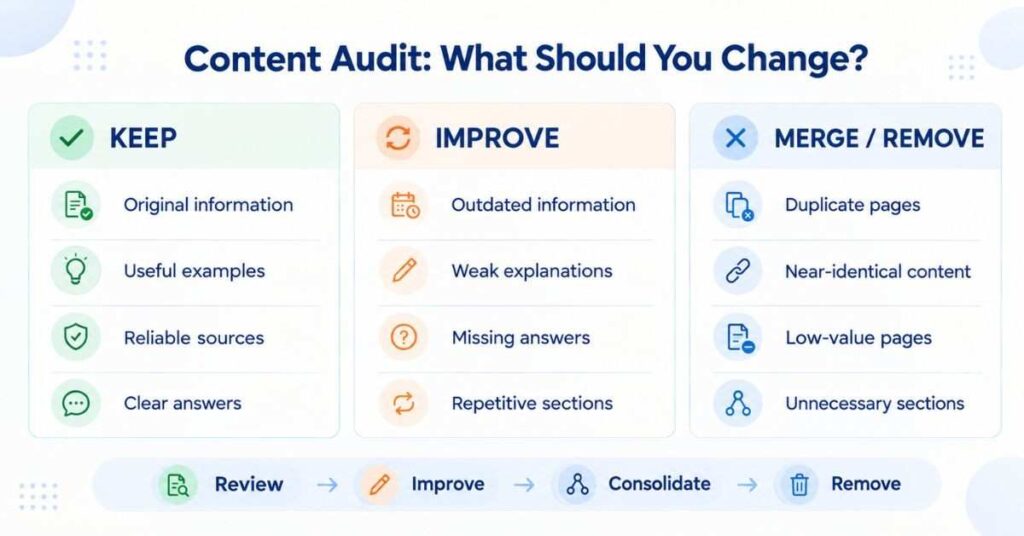
A more practical approach is to classify pages.
Keep
The article is useful and accurate.
Improve
The topic is good, but the page needs better information.
Merge
Two or more pages answer essentially the same question.
Remove
The page has little legitimate purpose and isn’t worth maintaining.
This gives you a much cleaner site without destroying useful content.
Don’t Chase a “Perfect AI Score”
This is worth mentioning because of the screenshot you sent.
If an AI detector says:
47.9% AI
that doesn’t mean:
“Google will rank this article 47.9% lower.”
There is no such formula.
And if another detector says 8% while another says 70%, that doesn’t mean the article changed.
AI detectors are probabilistic tools.
So don’t rewrite an article 15 times simply to get a detector from 48% to 5%.
Instead, make the article genuinely better.
Use:
- specific examples
- real sources
- original explanations
- natural wording
- meaningful opinions where appropriate
- useful details
- clear reasoning
- less repetitive structure
If the content is genuinely yours and genuinely useful, that’s a much better goal than chasing a detector score.
The Bigger Lesson From This Update
I think this is where website owners should change their mindset.
For years, SEO often became a numbers game:
More keywords.
More articles.
More backlinks.
More pages.
More exact-match anchors.
That approach can work for a while.
But it becomes fragile.
A better model is:
Fewer but stronger pages.
Not necessarily fewer pages overall.
Just fewer pages that exist for no real reason.
If a user searches something and lands on your article, they should feel:
“Yes. This actually answered what I wanted to know.”
That’s a much harder standard than hitting a word count.
But it’s also much more sustainable.
What I Would Do With a Website Starting Today
If I were launching a new information website in 2026, I wouldn’t start with:
“How many articles can I publish this month?”
I’d start with:
“What questions are people asking where the current answers are incomplete, outdated, confusing or wrong?”
Then I’d build around those questions.
One excellent article can answer:
- the main question
- related questions
- common mistakes
- practical examples
- comparisons
- next steps
That creates a useful resource instead of another page designed mainly to rank.
And that approach also works nicely for SEO, AEO and GEO because the underlying information is clear and well organized.
So, What Should You Do Right Now?
If your website lost traffic after September 24, don’t panic and don’t rebuild the site tonight.
The September 2026 Spam Update is still rolling out, and Google says the process can take up to two weeks.
Start by collecting evidence.
Find the pages that dropped.
Find the queries that disappeared.
Look for patterns.
Then inspect those pages honestly.
Are they genuinely useful?
Are they original?
Do they contain information that users can’t easily get somewhere else?
Are several pages basically saying the same thing?
Were they created at scale without enough original value?
Are there suspicious links?
Does unrelated third-party content exist on an otherwise trusted domain?
Are there technical problems?
Those questions will tell you much more than a generic “Google update recovery checklist.”
And if you find a problem, fix the problem—not just the symptom.
Don’t rewrite an article simply because its ranking dropped.
Don’t buy backlinks simply because traffic fell.
Don’t delete hundreds of URLs because someone on an SEO forum told you thin content is bad.
Understand first. Change second. Measure third.
That’s the approach I would take.
Final Takeaway
Google updates are uncomfortable because website owners don’t control them.
You can control something else, though: the quality and usefulness of your website.
The September 2026 Spam Update is a good reason to take a hard look at your site, especially if you’ve been publishing large amounts of similar content, relying heavily on automatically generated pages, creating location pages with little unique value, using aggressive SEO tactics, or adding unrelated third-party content simply because your domain already has authority.
But don’t assume every ranking drop means you did something wrong.
The current update is still rolling out. Google has officially said the September 2026 Spam Update began on September 24 and may take up to two weeks to complete.
Frequently Asked Questions About the Google September 2026 Spam Update
1. Why did my website traffic drop after the September 2026 Google Spam Update?
A traffic drop does not automatically mean Google has penalized your website. The first thing to do is check Google Search Console and find out which pages and search queries lost clicks or impressions. If the drop is limited to certain types of pages, such as affiliate articles, location pages, or repetitive content, those pages deserve a closer look.
2. How do I know if my website was affected by the Google September 2026 Spam Update?
There isn’t a simple “affected” button in Search Console. Instead, compare your organic clicks, impressions, rankings, and top pages before and after the update started. If several pages experienced a noticeable change around the same time, especially pages with similar content patterns, that is a good reason to investigate further.
3. Should I delete pages that lost their Google rankings?
No. A ranking drop by itself isn’t a reason to delete a page. First ask whether the page is still useful, accurate, original, and relevant to the searcher’s question. Some pages may need better information, while others may make more sense when combined with a similar page. Only remove content when there is a clear reason to do so.
4. Does Google penalize websites for using AI-generated content?
Using AI to help create content is not the same thing as publishing low-value content. The bigger concern is whether a website is producing large amounts of content mainly to attract search traffic without adding useful or original information. If you use AI, make sure the finished article has real value, accurate information, clear explanations, and something worth reading.
5. My website lost 50% of its traffic. What should I check first?
Don’t start rewriting everything. Open Google Search Console and find out where the loss happened. Check your pages, queries, impressions, clicks, and average positions. After that, rule out technical problems such as indexing issues, accidental noindex tags, canonical errors, redirects, server problems, or changes to your robots.txt file.
6. How long should I wait before changing my website after a Google update?
Give the update enough time to roll out before making large, sitewide changes. Google’s September 2026 Spam Update began on September 24, 2026, and Google says the rollout can take up to two weeks. In the meantime, collect your data and identify which pages are actually changing instead of reacting to every daily ranking fluctuation.
7. Should I rewrite an article if its Google ranking suddenly drops?
Not necessarily. A ranking drop doesn’t automatically mean the article is poor. Read the page again from a visitor’s perspective and compare it with the current search results. Is important information missing? Are some sections outdated or repetitive? Does the article actually answer the question that brought the visitor there? If the answer is yes, improve those areas rather than rewriting the page just for the sake of changing it.
8. Can having many similar pages hurt my website?
Pages that target essentially the same search intent can create unnecessary overlap. For example, having separate pages called “Best Hosting,” “Top Hosting Providers,” and “Best Hosting Services” doesn’t make much sense if all three contain almost the same information. In that situation, a stronger main page plus genuinely useful supporting articles may be a better structure.
9. What should I do with old or low-value content?
Don’t treat every old page the same way. Some old articles simply need updated information. Some have useful information but need better explanations. Others overlap with another page and could be consolidated. If a page has little useful purpose and cannot reasonably be improved, removal may make more sense.
10. How can I recover my website after a Google spam update?
There isn’t one recovery trick that works for every website. Start by identifying exactly what changed, then look for patterns among the affected pages. Improve weak or outdated content, remove unnecessary repetition, consolidate overlapping pages, fix technical problems, and make sure the information genuinely satisfies the searcher’s intent. Then monitor the results instead of making constant changes.
